Hold a unit for the first shoppers
Hold one restocked unit for each of the first shoppers in line, send them a link only they can use, and see who holds a unit right now.
ProNeeds the Pro plan.
Before you start
- Your store is on the Pro plan.
- You can allow Waitly to create draft orders in your store. Each hold is a draft order.
- 1
Choose Reserve for the first shoppers
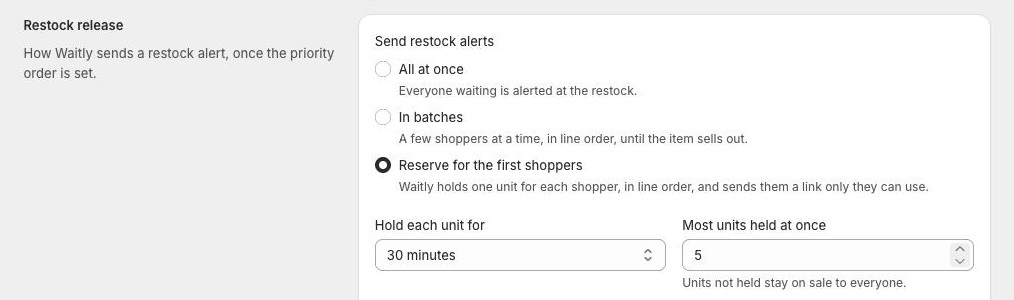
In Waitly, choose Settings, scroll to Restock release and select Reserve for the first shoppers.
With this on, Waitly holds one unit for each shopper, in line order, and sends them a link only they can use. Units that aren’t held stay on sale to everyone.
Shopify admin · Waitly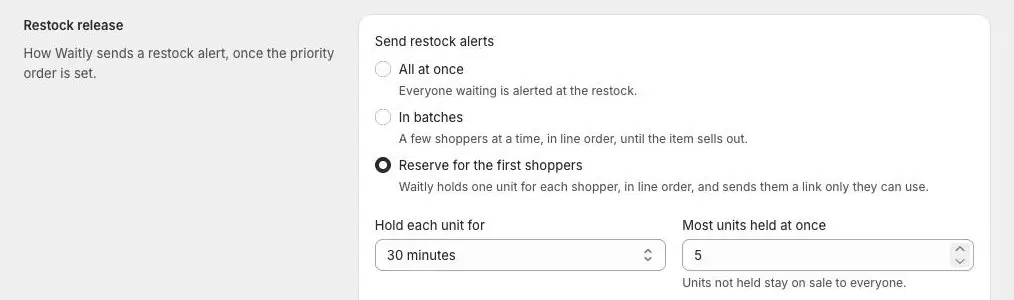
- 1Select Reserve for the first shoppers
- 2
Allow draft orders
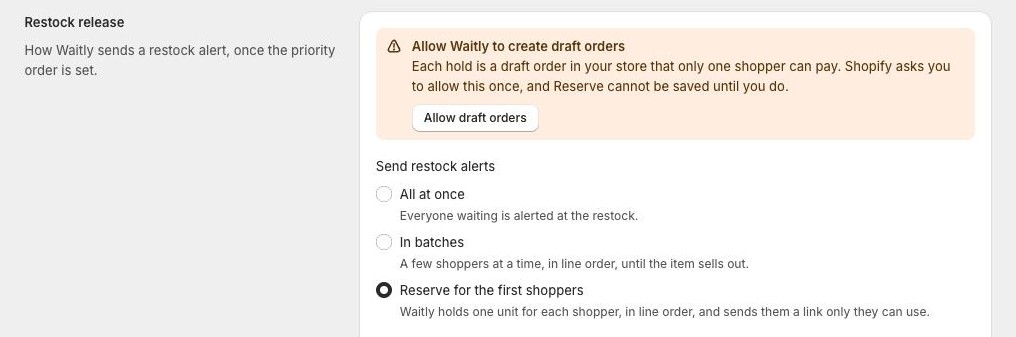
The first time you choose Reserve, a banner asks you to Allow Waitly to create draft orders. Each hold is a draft order in your store that only one shopper can pay.
Select Allow draft orders and approve the request in the Shopify window that opens. The banner disappears once you’ve allowed it.
Shopify admin · Waitly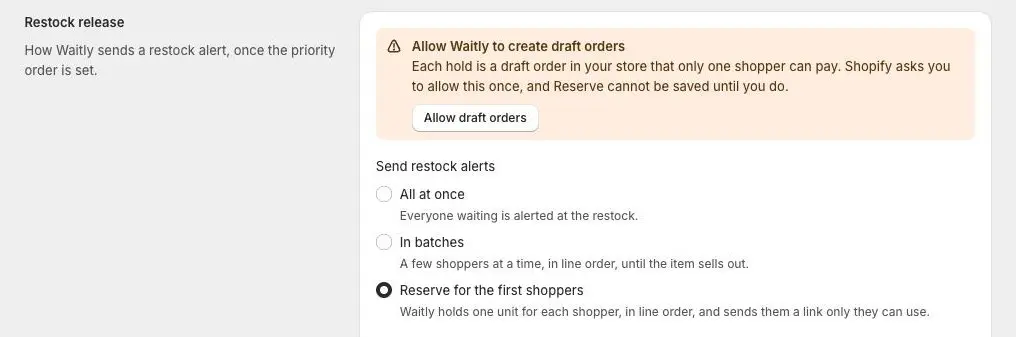
- 1The banner, the first time you choose Reserve
- 2Select Allow draft orders
Careful: Shopify only asks once, and Reserve can’t be saved until you allow it.
- 3
Set how long and how many
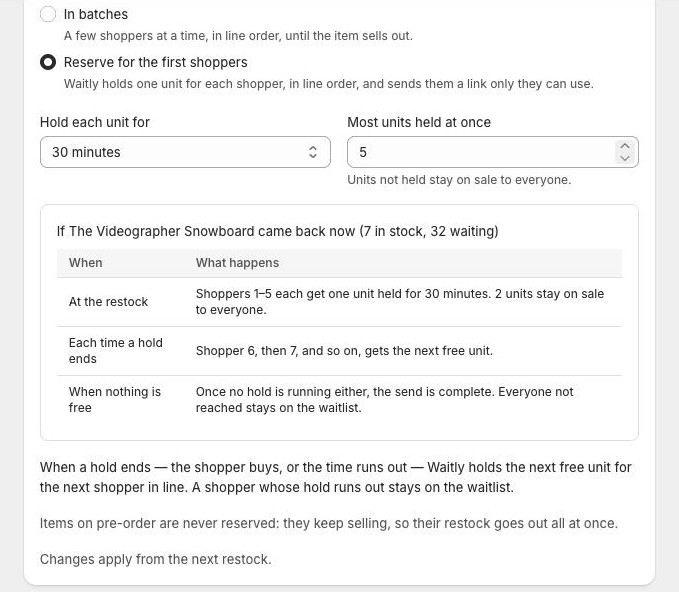
Hold each unit for is how long each shopper has to buy: 10 minutes, 30 minutes, 1 hour or 24 hours. Most units held at once is between 1 and 100. Units not held stay on sale to everyone.
Below the fields, Waitly plays your settings out on your largest waitlist: what happens At the restock, Each time a hold ends and When nothing is free. It updates as you type.
Shopify admin · Waitly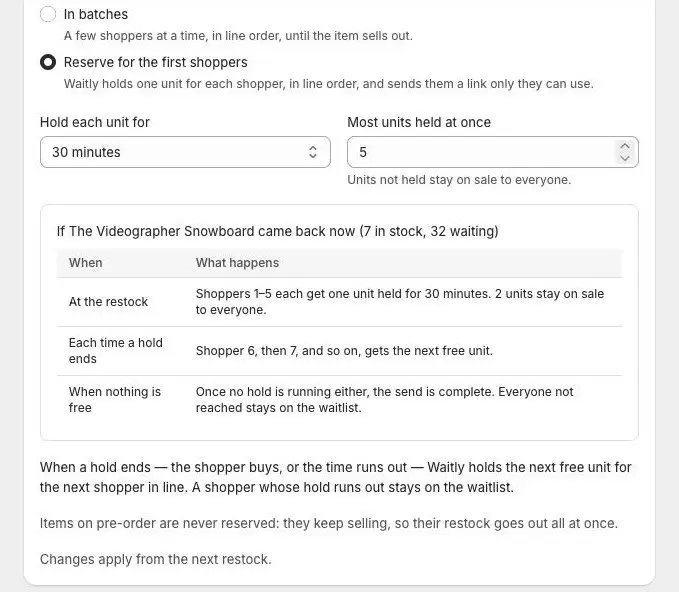
- 1How long, and how many
- 2How a restock would play out
Note: Items on pre-order are never reserved. They keep selling, so their restock goes out all at once.
- 4
Save
Select Save in the bar at the top of the page. Changes apply from the next restock.
- 5
What the first shoppers receive
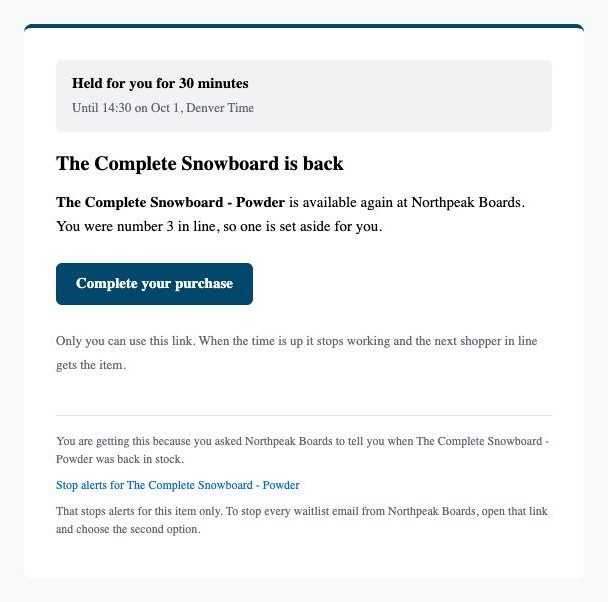
At the restock, each shopper with a held unit gets an email that says the item is held for them, until when, and which number they were in line. The Complete your purchase button takes them to checkout for their held unit.
Only that shopper can use the link. When the time is up it stops working, and the next shopper in line gets the unit.
Shopper’s inbox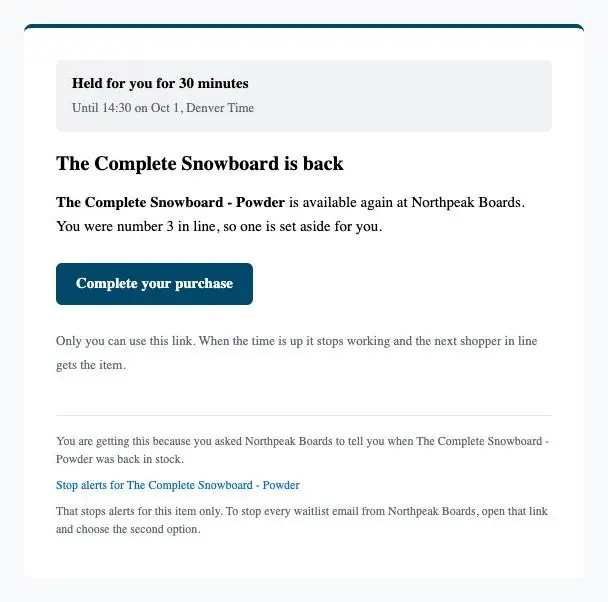
- 1How long the unit is held
- 2Their place in line
- 3Checkout for the held unit
- 6
See who holds a unit right now
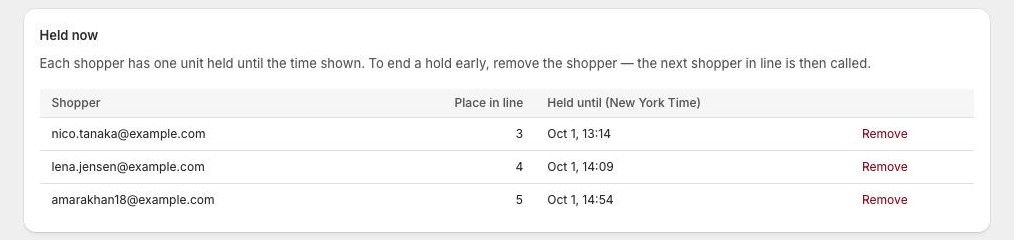
Open the product’s waitlist from Waitlists. While units are held, a Held now card lists each Shopper, their Place in line and Held until, in your store’s time zone.
To end a hold early, select Remove on the shopper’s row, then Remove again in the Remove shopper? window. This also takes the shopper off the waitlist. The unit held for them goes to the next shopper in line.
Shopify admin · Waitly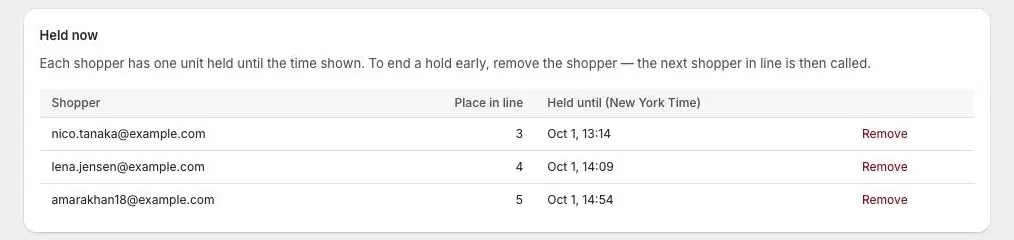
- 1Place in line
- 2When each hold ends
- 3End a hold early
- 7
Check the results in Analytics
In Analytics, under Restock alerts, a send that’s still holding units shows a line like 3 held now · next ends 14:30. Select it to open the waitlist.
The Held column counts units held during the send. Point at the number to see how many sold, lapsed (the time ran out, and the shopper is still waiting) and released (the shopper left the waitlist).
Shopify admin · Waitly
- 1Units held right now
- 2Units held during the send

Questions
- What happens to a shopper whose hold runs out?
- They stay on the waitlist. That restock won’t call them again, but a later one can.
- What if Waitly can’t create draft orders?
- Reserve can’t be saved until you allow draft orders. If that permission is later taken away, the restock goes out all at once instead, and the send log says “Not reserved: draft-order access is missing”.
- Does a hold stop other people buying the item?
- Only the held units. Units not held stay on sale to everyone while the holds run.
Read next
- Put VIPs first with waitlist priorityChoose which shoppers hear about a restock first, and see each shopper’s place in line on the waitlist.
- Send restock alerts in batchesAlert a few shoppers at a time, in line order, until the item sells out, and follow each batch in the send log.
- Check how a restock alert wentFind each restock alert Waitly sent, see how many went out, and what happened to the rest.