Set alert and attribution rules
Choose how long an alert holds a shopper’s place, how many alerts one shopper gets, and how long a sale counts as recovered.
Before you start
- Waitly is installed. These settings are on every plan.
- 1
Open the Notifications settings
In Waitly, choose Settings and find the Notifications group. It has three numbers, each with its allowed range written under it.
Shopify admin · Waitly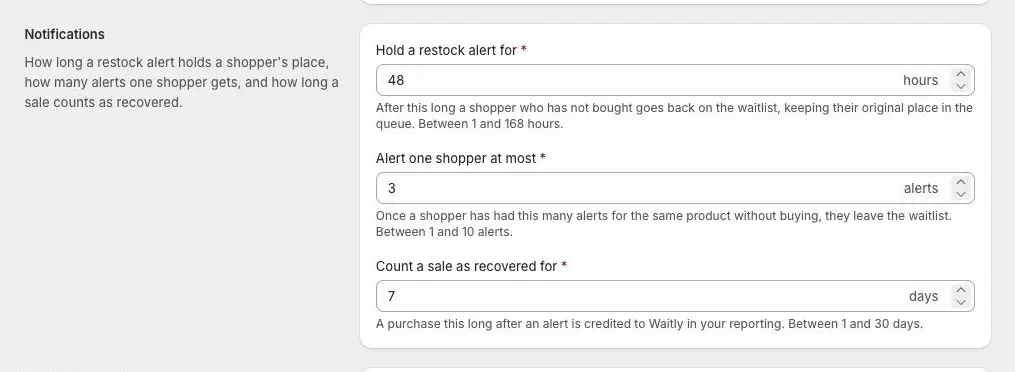
- 1How long an alert holds
- 2Most alerts per shopper
- 3Days a sale counts as recovered
- 2
Choose how long an alert holds
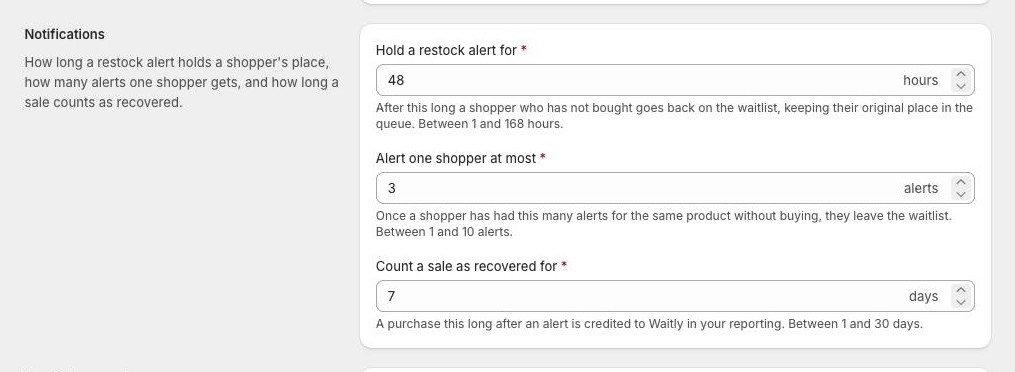
Hold a restock alert for sets how long a shopper has to buy after their alert, from 1 to 168 hours. The default is 48 hours.
During that time the shopper shows as Alerted, still deciding on the waitlist. If they haven’t bought when it ends, they go back on the waitlist and keep their original place in the queue.
Note: While a shopper is still deciding, they aren’t alerted again, even if the item restocks a second time. A long hold keeps them out of the next restock’s alerts until it ends.
- 3
Limit how many alerts one shopper gets
Alert one shopper at most sets how many alerts a shopper can get for the same product, from 1 to 10. The default is 3.
Once a shopper has had that many alerts without buying, they leave the waitlist and their status becomes Expired.
Tip: Every alert counts toward your plan’s restock alerts for the billing cycle, so a lower limit also saves allowance.
- 4
Choose when a sale counts as recovered
Count a sale as recovered for sets how many days after an alert a purchase is credited to Waitly, from 1 to 30. The default is 7 days.
A shopper who buys within that time shows as Bought after alert, and on Growth and Pro the order counts toward Recovered revenue in your reports. A shopper who buys later, or without an alert, shows as Bought anyway.
- 5
Save your changes
Select Save in the bar at the top of the page. Waitly shows Settings saved when it’s done. If a number is outside its range, the field says so and nothing is saved until you fix it.
Questions
- Why can’t the recovered window be longer than 30 days?
- Waitly keeps waitlist history for at least 30 days. A longer window could outlive the record of the alert it’s meant to credit.
- Does the Customer tag use the same window?
- Yes. On Growth and Pro, only buyers counted as Bought after alert get the customer tag.
Read next
- How restock alerts are sentUnderstand when Waitly sends a restock alert, who gets it, how long an alert holds a shopper, and when an alert is held back.
- Tag customers an alert brought backHave Waitly add a Shopify customer tag to every buyer a Waitly alert brought back, so you can find them in Customers.
- Track your monthly allowancesSee how many restock alerts and preorders you’ve used this billing cycle, and what happens when one runs out.